Club Managers: Most Revenue Recurring? Membership Software Beats CRM
Published 18 September 2026

If your club runs scheduled sessions and depends on recurring dues, choose membership management software first. Reach for a CRM when sponsorship pipelines, fundraising, or complex B2B sales dominate your workload, and combine both only once one platform alone is visibly straining. The comparison below breaks down exactly where each category earns its keep.
TL;DR:
- Membership software is essential for clubs with scheduled sessions and recurring income, offering native support for renewals, bookings, payments, and member portals.
- CRMs excel in managing sponsor pipelines, sales cycles, and external relationships but lack core features like waitlists, capacity limits, and recurring billing.
- Larger clubs with diverse functions, such as athlete development and sponsorship management, benefit from integrated or hybrid platforms to avoid complex workarounds.
- Proper vendor evaluation should prioritize features like native booking management, safeguarding, and clear pricing models, with timelines around six to ten weeks for a full rollout.
- Success hinges on choosing a tool that matches the workload, while misfits cause administrative inefficiencies, especially when forcing one system to do the other’s job.
Table of Contents
- Sports club CRM vs membership software: what each one actually does
- When membership management software is the right choice
- When a CRM is the right choice for your club
- When you need both, or a hybrid platform
- How to choose and implement the right platform
- LevelUp360HQ’s fit for clubs juggling both athlete development and admin
- Cost comparison: pricing models side by side
- How long selection and rollout actually take
- What success and failure actually look like in practice
- A quick rule of thumb before you decide
- Request a demo of LevelUp360HQ
- Sources
- FAQ
Sports club CRM vs membership software: what each one actually does
The confusion starts because both categories promise to “manage your club”, but they were built to solve different problems. A CRM (customer relationship management) tool tracks relationships and sales conversations. Membership software runs the operational plumbing of a club: who’s booked in, who’s paid, and who’s due to renew. A third category, association management software (AMS), adds governance layers like committees and CPD tracking, and matters mainly for larger membership bodies rather than a five-a-side club or a swim academy.
Because the three categories overlap but differ in core purpose, the practical test is simple: does your club sell into a pipeline, or does it run a recurring schedule? Here’s how the core features stack up natively, without bolt-on customisation:
- Renewals and dues: membership software handles these automatically with expiry alerts and payment retries; a generic CRM needs custom fields and manual workflows.
- Bookings and scheduling: membership platforms typically include calendars, capacity limits, and waitlists out of the box; CRMs rarely do.
- Payments: membership software usually integrates recurring billing directly; CRMs handle one-off invoicing better than subscriptions.
- Member portal: membership tools give members self-service login for bookings and payment history; CRMs are built for staff use, not member-facing access.
- Attendance and rosters: membership software logs check-ins and squad lists natively; CRMs have no concept of a “roster” unless heavily adapted.
- Sales pipelines: CRMs excel here, tracking sponsor deals and lead stages through a funnel; membership software has no equivalent.
- Campaign automation: both can send emails, but CRMs are built for segmented, multi-touch sales sequences, while membership software automation tends to focus on renewal reminders.
The operational cost of picking wrong shows up fast. Clubs that force a CRM to run bookings end up building custom objects for “session” and “attendance”, which breaks the moment a coach needs to swap a Tuesday slot. Membership management software runs recurring bookings, renewals and payments natively, which is precisely why facility- and instructor-led clubs default to it. When you’re scanning vendor sites, look for the words “member portal” and “recurring billing” as the giveaway for membership software, and “pipeline” or “deal stages” as the giveaway for a CRM.
When membership management software is the right choice
Membership software is the right call the moment your club’s revenue and admin load are built around a schedule rather than a sales cycle. Three signals confirm it:
- You run scheduled classes, training sessions, or fixtures that need bookings and capacity management every week.
- Most income comes from recurring subscriptions or termly dues rather than one-off sponsorship deals.
- Members expect to log in themselves to check bookings, update payment details, or download an invoice, rather than ringing the office.
Once two of those three are true, a membership platform will save more admin hours than a CRM ever will. The features that do the heavy lifting are the ones you rarely think about until they’re missing: automatic renewal reminders that fire weeks before a card expires, failed-payment retries that chase a lapsed direct debit without a manual phone call, and waitlists that promote the next family automatically when a slot frees up. These aren’t luxuries. They’re the difference between a club treasurer chasing invoices every Sunday night and a system that quietly protects cashflow in the background.
Membership-native tools also tend to build safeguarding and parent/guardian workflows into the member record itself, which matters enormously for youth clubs. A generic CRM has no native concept of “parent contact for a under-16 athlete” or “consent form expiry”, and retrofitting one is where things usually go wrong. Practitioners routinely warn that generic CRMs are a poor fit for youth sports logistics unless someone invests serious time customising rosters, parent communications, and consent tracking, and most volunteer-run clubs don’t have that time to spare.
Pro Tip: Before you sign anything, ask whether the vendor charges per member, per active user (staff seats), or a flat platform fee. Pricing models vary considerably between per-user and per-member structures, and a per-user CRM licence can quietly cost more than a per-member membership platform once your coaching staff grows past a handful of logins.
When a CRM is the right choice for your club
A CRM earns its place when your club’s growth depends on relationships that don’t fit inside a membership record: sponsors, major donors, corporate partners, or a multi-stage sales process for hospitality packages. If you’re chasing six-figure sponsorship deals through a pipeline with proposal stages, follow-ups, and contract negotiation, a membership platform simply has no field for that. A CRM does.
Signs you actually need one include:
- A dedicated sponsorship or fundraising function that tracks prospects through defined stages, not just a spreadsheet of contacts.
- Multiple staff members working the same sponsor or donor relationship who need shared visibility on the last conversation and next action.
- A sales cycle measured in weeks or months, involving proposals, contracts, and renegotiation, rather than a single online payment.
- A need to segment and automate outreach to alumni, corporate members, or high-value donors differently from ordinary members.
What CRMs are genuinely excellent at is the thing membership software barely touches: turning a cold enquiry into a closed deal, then remembering every touchpoint along the way. A CRM built for sports clubs supports the entire lifecycle from first enquiry through to long-term participation, and the same automation that nurtures a sponsor lead can flag a lapsing member for a renewal call if you configure it that way. That’s the appeal, and also the trap: configuring a general CRM to also run bookings and rosters usually means paying a consultant to build what membership software gives you by default.
The practical pattern that works for most clubs running both is a clean split: CRM for anything external and deal-shaped (sponsors, corporate partnerships, big donors), and membership software for anything member-facing and recurring (bookings, dues, attendance). Keep the two systems talking through a simple sync rather than trying to force one tool to do both jobs. A club that tries to run its Saturday morning junior sessions through a sales pipeline built for enterprise software deals will spend more time fighting the tool than using it.
When you need both, or a hybrid platform
Larger academies, multi-sport clubs, and sponsorship-heavy organisations often outgrow the “pick one” framing entirely. A club running four sports across four age groups, with a corporate sponsorship arm and a retail store, genuinely has both a CRM problem and a membership problem at the same time. Trying to solve it with one tool stretched thin usually means someone’s job becomes “fix the workaround” rather than “grow the club”.
You’ve broadly got three ways to connect the two sides:
- Native integration: the vendor already builds a two-way sync between its CRM and membership modules, which is the lowest-maintenance option if it exists for your chosen tools.
- Middleware: a connector service maps fields between separate CRM and membership platforms; this reduces manual double-entry but needs someone watching it for drift.
- API sync or one-time export: a direct API connection stays current but needs ongoing monitoring, while a one-off CSV migration is simpler upfront but leaves you re-establishing webhooks and live feeds later. Both integration paths carry a real maintenance cost that’s easy to underestimate at signing.
For data-heavy syncs between a club platform and external booking or planning tools, a specialist integration partner like Tineo can also handle the connective layer without your admin staff manually reconciling two systems.
Total cost of ownership is where the “buy two tools” plan quietly falls apart. Two subscriptions, two support contracts, and one internal person who understands the sync is often more expensive over three years than a single platform that leans slightly toward one side of the CRM/membership divide. Comparisons across the category show that very few tools genuinely span both admin and team-ops without trade-offs, so the honest question to ask a vendor isn’t “does it do everything” but “what does it do worse than a specialist tool, and can I live with that.”
How to choose and implement the right platform
Run every vendor demo against the same scoring matrix so you’re comparing like for like, not slick sales decks. Score each on:
- Payments: does it handle recurring billing, failed-payment retries, and refunds natively?
- Rostering and bookings: can it manage waitlists, capacity limits, and multi-session schedules without a workaround?
- Safeguarding and consent: does it store guardian details, consent expiry, and DBS or equivalent checks against the member record?
- Integrations: does it connect to your accounting software, comms tools, or CRM without middleware?
- Pricing shape: is it per-member, per-user, or flat-fee, and does that scale sensibly as you grow?
- Admin usability: can a volunteer treasurer actually use it, or does it need a dedicated systems administrator?
During the demo itself, ask three questions that separate genuine fit from a good sales pitch: can you export all your data in a standard format if you leave, are there hidden fees for SMS, extra staff seats, or payment processing, and what’s the guaranteed support response time in writing. A vendor that hedges on data export is a red flag worth walking away from.
Migration itself follows a predictable sequence:
- Export: pull member records complete with membership status, payment history, consent forms, and attendance history from the old system.
- Map: match old fields to new ones before importing anything, because mapping these fields properly avoids weeks of reconciliation work later.
- Pilot: run one team or age group on the new system for a full billing cycle before switching everyone.
- Train staff: give coaches and admin at least one hands-on session before go-live, not just a video link.
- Go live: pick a quiet point in the season, ideally between terms, and keep the old system read-only for reference for at least a month.
A realistic timeline for a mid-sized club is six to ten weeks from vendor selection to full go-live, with the pilot phase eating up roughly a third of that.
LevelUp360HQ’s fit for clubs juggling both athlete development and admin
LevelUp360HQ approaches this differently by combining the two sides in one system rather than asking clubs to stitch them together. The platform pairs gamified athlete development, including live player cards, XP-driven challenges, and tier progression, with club administration tools such as subscription management, session workflows, coach approval tools, and white-label branding.
That combination fits a specific club profile best:
- Multi-sport academies running football, cricket, netball, or rugby programmes that want one system rather than separate ones per sport.
- Clubs whose growth strategy leans on athlete engagement and retention (leaderboards, badges, progression) alongside standard membership admin.
- Programmes looking to monetise beyond dues, through store integrations and revenue-sharing features built into the same platform.
It won’t be the right fit for a club whose entire need is a sponsor sales pipeline with no member-facing side at all. But for clubs where athlete development and membership operations are equally important, running both from one login removes the sync problem entirely.
Cost comparison: pricing models side by side
Pricing shape matters as much as the headline number, because it decides whether costs grow predictably or spike as your club scales. CRMs built for sales teams tend to charge per active user (a licence per staff seat), which gets expensive fast if every coach and admin needs a login. Membership software usually flips that model, charging per member or a tiered flat fee, so adding coaching staff doesn’t inflate your bill.
Pricing model transparency, whether per-member, per-user, or modular add-on fees, is one of the biggest hidden costs clubs discover only after signing. A CRM quoted at a low base price can balloon once you add automation credits, extra pipelines, or premium reporting as separate line items. Membership platforms tend to bundle more into the base tier, but watch for payment processing fees stacked on top of the subscription itself.
LevelUp360HQ’s own structure illustrates the hybrid pricing shape worth comparing against: its Pro plan runs £49 per month, plus an active athlete platform fee of £1.50 per month per active athlete, with revenue share available on request. That per-athlete component scales with genuine usage rather than staff headcount, which matters if your coaching team is larger than your paid athlete base. When comparing quotes, always convert every vendor’s pricing to a projected annual cost at your actual member count and staff size, not the number on the pricing page.
How long selection and rollout actually take
Most sports clubs underestimate the selection phase and overestimate how long implementation takes once a decision is made. Realistically, budget two to three weeks for shortlisting and demos, comparing three to five vendors against the scoring matrix covered earlier. Rushing this stage is the single biggest cause of buyer’s remorse, because red flags around data export or hidden fees only surface when you push a vendor on specifics.
Implementation, once you’ve chosen, typically runs four to seven weeks for a club with a few hundred members: a week for data export and mapping, two to three weeks running a pilot with one team or age group, a week for staff training, and a final week held in reserve for go-live troubleshooting. Larger multi-sport academies with several hundred members across multiple programmes should add two to three weeks to that estimate, mainly for mapping historical attendance and consent data across sports.
The timing of go-live matters more than most clubs realise. Switching systems mid-season, especially during a busy renewal period, multiplies support tickets and confuses members who suddenly see a different login page. The smoother route is scheduling go-live for a natural break, between terms or seasons, when nobody’s mid-booking and the old system can sit untouched as a read-only backup for a month while everyone settles in.
What success and failure actually look like in practice
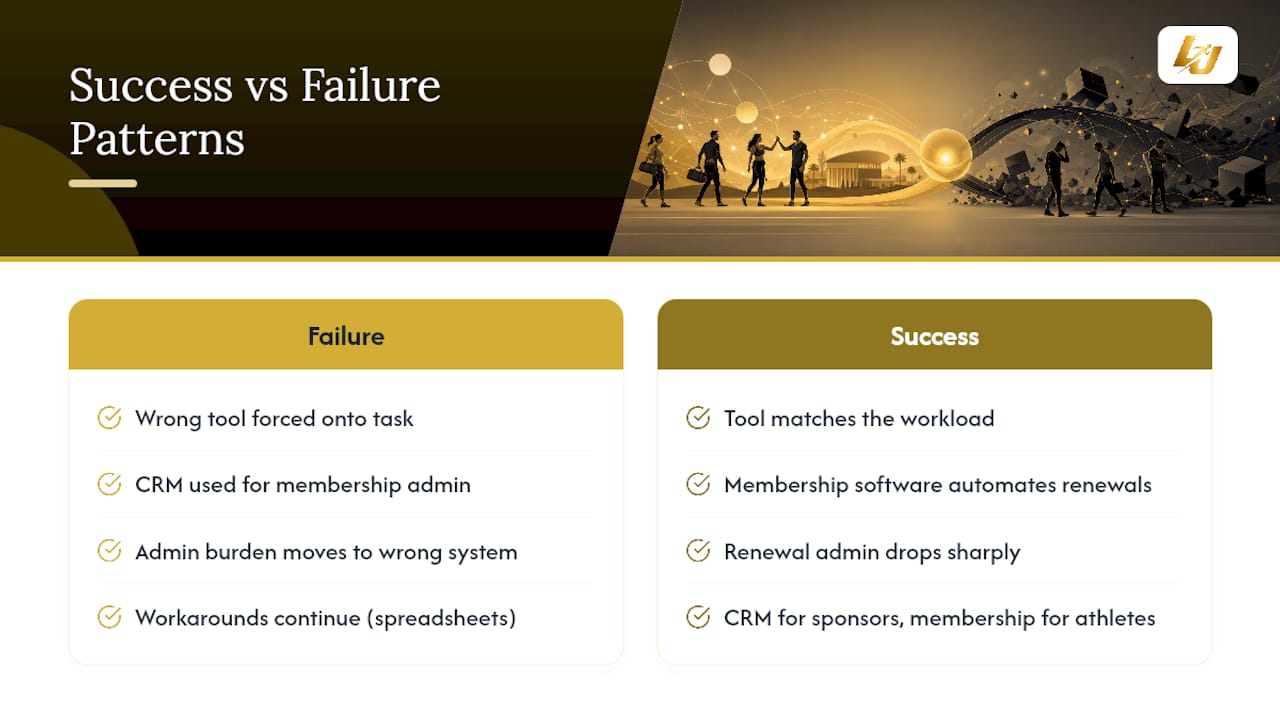
The clearest failure pattern shows up when a club forces a generic CRM to do a membership platform’s job. A common scenario: a youth football club adopts a sales-focused CRM because a board member used it at their day job, then spends months building custom fields for “training session” and “parent contact”, only to find waitlists and payment retries still don’t work properly. The admin burden doesn’t disappear, it just moves from spreadsheets into a system that was never designed to carry it.
The inverse failure is just as real. A club with a serious sponsorship arm adopts membership software expecting it to also manage corporate partnership pipelines, then discovers there’s no way to track a six-month sponsorship negotiation through stages, so the sales team quietly reverts to a spreadsheet anyway.
Success stories share a common thread: the tool matches the workload it’s actually asked to carry. A swimming club running weekly lessons and termly renewals that adopts dedicated membership software typically sees renewal admin drop sharply, because automated reminders and payment retries replace manual chasing. A multi-sport academy running sponsorship deals alongside member programmes that keep a CRM for sponsors and a membership platform, or a combined system, for athletes avoids forcing either side into the wrong tool. The pattern holds regardless of sport or size: match the system to the workload, not the workload to whatever system is already installed.
A quick rule of thumb before you decide
If more than half your club’s revenue comes from recurring session fees or dues, start your search with membership software, not a CRM. That single ratio settles more debates than any feature comparison, because it tells you which admin burden is actually costing you time each week.
The mistake I see most often isn’t choosing the wrong category. It’s buying based on what a similar club used, rather than what your own revenue mix and admin load actually demand. Sponsorship-heavy clubs and scheduling-heavy clubs are solving different problems, even when they call themselves the same kind of organisation.
— Chris
Request a demo of LevelUp360HQ
If your club’s needs span both sides of this comparison, athlete development and day-to-day membership admin, running two separate systems is exactly the maintenance burden the integration section above warned about. LevelUp360HQ combines gamified player tracking, subscription management, session workflows, and white-label club administration in one platform to unify athlete development and admin functions.
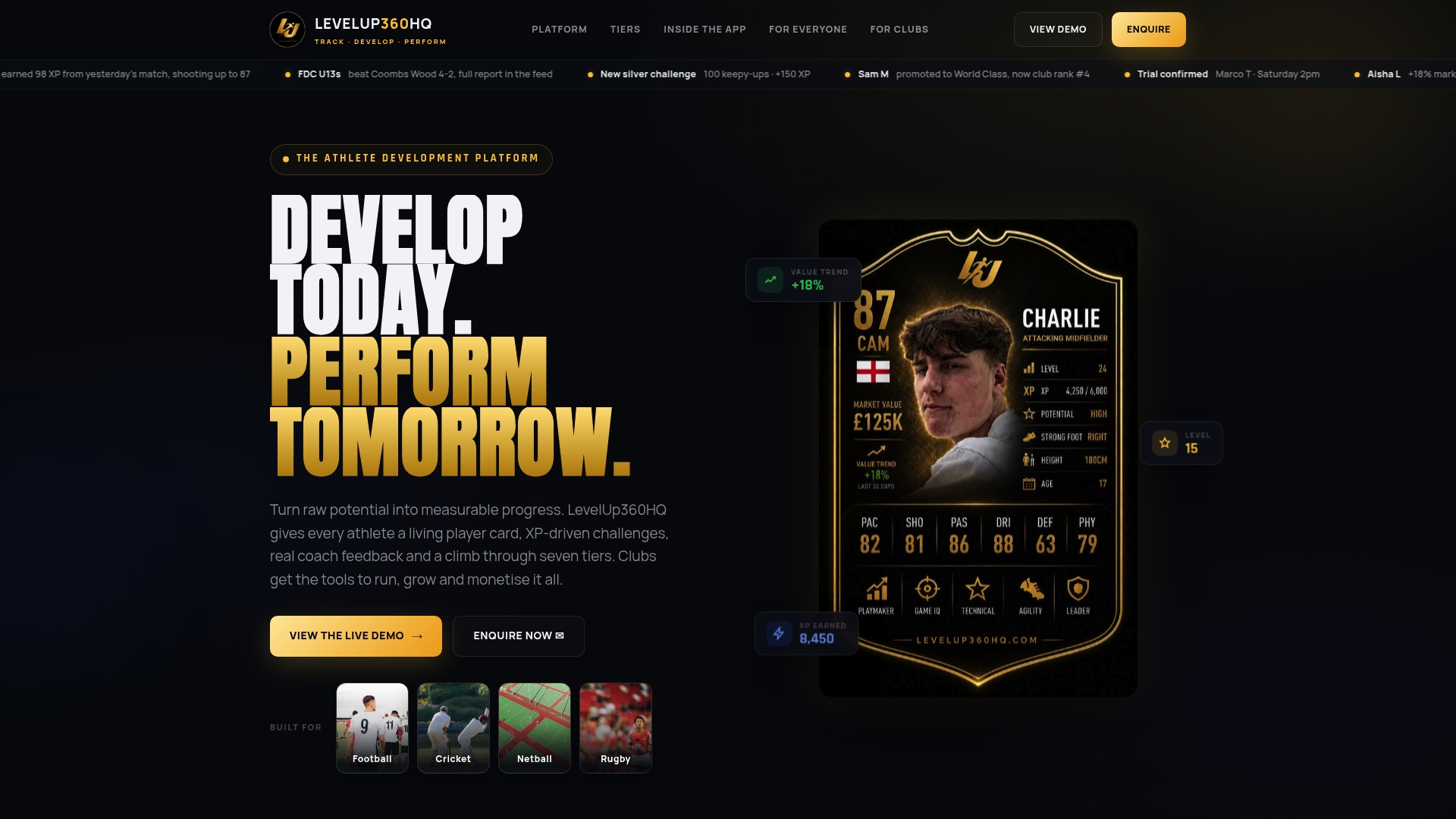
The Pro plan costs £49 per month plus an active athlete platform fee of £1.50 per month per active athlete, with revenue share available on request. Multi-sport academies and clubs built around athlete development and monetisation tend to get the most from the combined feature set, including player cards, XP progression, and store integrations, rather than piecing together separate tools for admin and engagement. If that profile sounds like your club, you can book a demo or explore the full platform overview to see how the pieces fit together before you commit.
Sources
- CRMs for sports clubs: 5 top solutions for managers and owners
- Membership Management Software vs. CRM: Which Is Best?
- AMS vs CRM vs membership software: which does your organisation need?
- Customer relationship management software pricing models | Capterra
FAQ
What is the best software for managing sports clubs?
There’s no single best option; it depends on whether your club is scheduling-and-dues driven (membership software) or sales-and-sponsorship driven (a CRM). Clubs needing both athlete development and admin in one system, such as multi-sport academies, often turn to a combined platform like LevelUp360HQ.
What is the best app for managing club memberships?
Look for membership-native features rather than a general-purpose tool: automated renewals, recurring billing, a self-service member portal, and built-in rostering. Membership platforms handle these natively, which is precisely why they outperform adapted CRMs for this job.
What is the best software for club management overall?
For pure club management covering bookings, dues, and member self-service, dedicated membership software usually wins. For clubs also running sponsor pipelines or needing athlete development features alongside admin, a hybrid platform such as LevelUp360HQ removes the need to run two separate systems.
What CRM do most gyms use?
Gyms and clubs vary widely in their CRM choice, and there’s no single dominant vendor across the sector. Many gyms actually use dedicated membership or gym-management software rather than a generic CRM, precisely because recurring billing and bookings work better natively than when bolted onto a sales-focused tool.
Can a CRM replace membership software entirely?
Generally not without heavy customisation. Generic CRMs are commonly a poor fit for youth sports logistics like rosters, parent communications, and safeguarding, unless a club invests significant time building those features manually.
Turn potential into a player card.
LevelUp360 tracks every match, builds your child's player card, and shows their development over time.
Get started free