90 to 180 Day Payback: Sports Academy Software ROI for Academy Owners
Published 16 September 2026

Sports academy management software pays for itself for most operators, typically within 90 days to six months, and the return comes from three places: reclaimed admin hours, recovered revenue that would otherwise leak away, and better retention. Whether it works for you depends largely on how inefficient your current manual processes already are.
TL;DR:
- Most sports academies see a return on management software within three to six months through time savings, revenue recovery, and improved athlete retention.
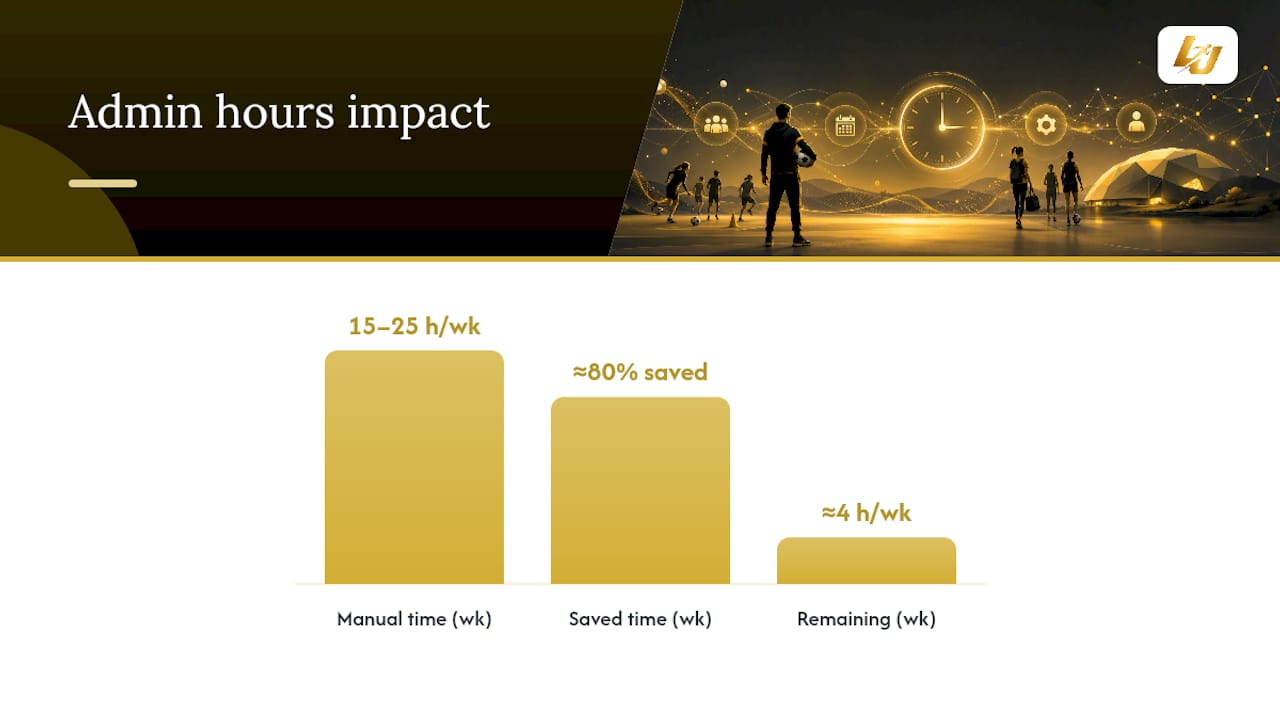
- Manual admin tasks like scheduling, invoicing, and follow-up often waste 15 to 25 hours weekly, which software can reduce by up to 80%.
- Key revenue leaks include unfilled slots, missed payments, no-shows, double bookings, and poor lead follow-up, all of which targeted automation can address.
- Prioritizing renewal automation and card-on-file bookings offers the fastest setup, easiest measurement, and quickest financial impact.
- Tracking utilization, revenue per slot, no-show rates, admin hours, and retention figures before and after implementation provides a clear ROI picture.
Table of Contents
- Breaking down the ROI: time savings, revenue recovery and retention
- Where does revenue actually leak out of an academy?
- How do you calculate your own software ROI?
- Which features actually move the ROI needle fastest?
- What’s the realistic timeline for seeing a return?
- How LevelUp360HQ maps to each ROI channel
- What’s the one lever worth prioritising first?
- See how LevelUp360HQ handles the numbers behind the game
- Sources
- FAQ
Breaking down the ROI: time savings, revenue recovery and retention
Academy owners tend to underestimate how much money manual admin actually costs, because it never shows up as a single line item. It’s scattered across a coach’s evening spent chasing payment reminders, a front-desk manager double-checking a spreadsheet, a parent who never got a renewal email.
Facility managers typically lose 15 to 25 hours a week to manual scheduling and communication, and purpose-built scheduling software has cut that workload by up to 80% in documented facility examples. Run the maths on a mid-sized academy: many hours a week at a blended staff rate around $22 an hour comes to a considerable annual admin time cost, before you even look at revenue.
Revenue recovery is the second channel, and it’s usually the one owners notice first once the software is running. Adopting management tools opens the door to dynamic pricing, segmented communication and centralised reporting that a spreadsheet simply can’t support. That means pricing peak evening slots differently to quiet Tuesday mornings, or spotting which membership tier is about to churn before it does.
Retention is the slower burn but the bigger multiplier over time. Every athlete who renews without a manual chase adds to lifetime value without adding to your admin load. Engagement tools built around progress tracking and gamified milestones give athletes and parents a reason to stay subscribed beyond just liking the coach.
The three channels stack rather than compete:
- Time savings: fewer admin hours spent on scheduling, invoicing and chasing payments.
- Revenue recovery: fewer empty slots, fewer missed payments, better pricing decisions.
- Retention lift: automated renewals and engagement features keep athletes enrolled longer.
Pro Tip: Track your admin hours for one real week before you buy anything. Most owners guess low. The actual number is usually the argument that gets a reluctant business partner on board.
Where does revenue actually leak out of an academy?
Most leakage hides in plain sight, because each individual instance looks small. An empty 6pm slot on a Tuesday feels like a shrug. Multiply that slot by 50 weeks and a $40 hourly rate, and you’ve quietly written off $2,000 a year for one recurring gap.
Run this checklist against your own calendar and billing history before you assume software will fix everything automatically:
- Empty slots and utilisation gaps. Pull your booking calendar for the last month and count unfilled sessions during your peak demand hours. Multiply the count by your average revenue per slot.
- Missed invoices and late payments. Check how many invoices went out manually last month versus how many were paid on time. Billing automation with card-on-file details closes most of this gap immediately.
- No-shows. Count sessions where the athlete simply didn’t turn up and nobody was charged. Deposit and credit policies, enforced automatically at booking, recover most of this revenue.
- Double bookings and scheduling errors. Any instance where two athletes were assigned the same coach or court is a service failure that costs you a refund or a reputation hit, or both.
- Lost leads and poor follow-up. Count enquiries from the last quarter that never converted because nobody followed up within 48 hours.
Each leak maps to a specific fix: centralised scheduling closes the double-booking problem, card-on-file bookings close the no-show problem, and CRM follow-up sequences close the lead problem.
How do you calculate your own software ROI?
The formula is straightforward, and you don’t need a finance background to run it:
(Annual admin savings + recovered revenue + retention lift value) − annual software cost = net ROI
Payback period = subscription cost ÷ monthly net benefit
You need seven inputs, and every one of them already exists somewhere in your business:
- Admin hours spent per week on scheduling, billing and communication
- Blended hourly rate for the staff doing that admin
- Current utilisation rate across your available coaching hours
- Average revenue per slot or hour
- No-show rate as a percentage of booked sessions
- Renewal or churn rate over the last 12 months
- Annual cost of the software you’re evaluating
Here’s a conservative worked example for a mid-sized academy running 40 coaching hours a week at $45 per hour:
At that pace, the software pays for its own annual cost inside two months, and the payback period shortens further as staff adoption improves. Run your own numbers with lower estimates first. If the ROI still holds up when you’re deliberately conservative, you’ve got a genuine business case rather than a hopeful one.
Which features actually move the ROI needle fastest?
Not every feature contributes equally, and prioritising the wrong one first is the most common reason academies feel underwhelmed after signing up.
- Renewal automation and CRM workflows. This is consistently flagged across sports academy CRM guides as the single highest-ROI feature, because it converts a manual, easily-forgotten task into a scheduled sequence that runs whether anyone remembers to send it or not.
- Bookings with card-on-file and deposits. Requiring payment details at the point of booking removes the incentive to skip a session without consequence, and it’s the fastest fix for chronic no-show problems.
- Automated billing and dunning. Late payments rarely get chased consistently by hand. Automated reminders and retry logic on failed cards recover revenue that would otherwise require an awkward phone call.
- Centralised scheduling. One calendar, visible to every coach and admin, eliminates the double-booking errors that come from three people managing three separate spreadsheets.
- Engagement and performance tracking. Progress badges, tier systems and visible improvement metrics give athletes a reason to stay subscribed past the initial enthusiasm of month one.
Start with renewal automation and card-on-file bookings. They’re the fastest to configure and the quickest to show up in your revenue numbers.
What’s the realistic timeline for seeing a return?
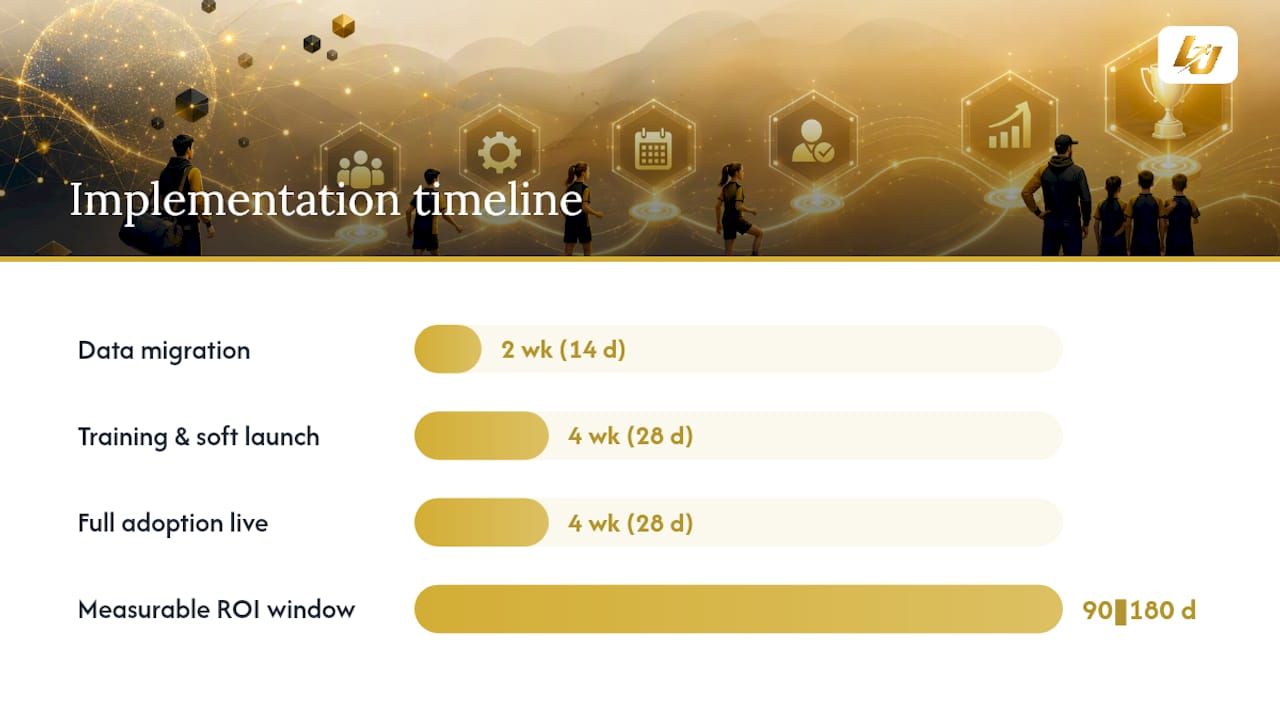
Implementation typically runs through three phases: data migration and setup in weeks one and two, staff training and soft launch through weeks three to six, and full adoption with all revenue-protecting features live by around week ten.
- Weeks 1 to 2: Migrate athlete and billing data, configure scheduling and pricing rules.
- Weeks 3 to 6: Train coaches and front-desk staff, run bookings and payments in parallel with any old system.
- Weeks 7 to 10: Switch fully to the new platform, enable renewal automation and dunning sequences.
- 90 days onward: Review utilisation, no-show and retention data against your baseline.
Well-integrated systems generally show measurable ROI within 90 days to six months as admin savings and automated collections start offsetting the subscription cost. The academies that miss this window usually share the same three mistakes: sloppy data migration that leaves gaps in athlete records, low staff adoption because nobody enforced the new process, and payment policies that exist on paper but aren’t actually enforced at the point of booking.
Pro Tip: Enforce card-on-file booking from day one, not as an optional upgrade later. Retrofitting a payment policy onto an existing member base is far harder than starting with it.
How LevelUp360HQ maps to each ROI channel
LevelUp360HQ was built around the same three levers this article has walked through, rather than treating them as separate add-ons.
- Time savings: CRM and subscription management automate renewals, billing and session scheduling, removing the manual admin load.
- Revenue recovery: Integrated payments and store functionality reduce missed billing and open additional revenue through merchandise and event bookings.
- Retention lift: Live player cards, XP-driven challenges and leaderboards give athletes a visible reason to stay engaged, which supports the renewal side of the equation.
The platform’s demo walks through how these pieces connect for football, cricket, netball and rugby programmes specifically.
What’s the one lever worth prioritising first?
If you take one thing from this, it’s renewal automation. It’s the fastest to set up, the easiest to measure, and the one most academies leave on the table for months after buying software that already supports it.
Two things to do this week: pull your no-show rate from the last 90 days, and switch on card-on-file requirements for every new booking starting now. Both take an afternoon. Both start paying you back before the month is out.
— Chris
See how LevelUp360HQ handles the numbers behind the game
This platform gives academies a direct route to the three ROI channels covered here, without asking you to bolt together separate tools for CRM, payments and athlete engagement. Renewal automation and subscription management sit alongside engagement features like live player cards and XP-based progression, so the retention lever and the admin-saving lever run on the same platform rather than two.

If you’re weighing this against a manual system or a patchwork of separate apps, the honest comparison is how much time and revenue each option actually recovers, not just the monthly fee. Booking a walkthrough on the LevelUp360HQ demo is the fastest way to see how the CRM, payments and gamification features apply to your own sport and squad size. You can also explore the full platform at Levelup360hq to see how the pieces fit together before you commit.
Sources
- The ROI of Multi-Sport Complex Management Software: Is It Worth the Investment?
- Implementing technological tools in sports management — LALIGA Business School
FAQ
Does sports academy software really pay for itself?
For most academies with meaningful manual admin, yes. The combination of reclaimed staff hours, recovered no-show and billing revenue, and improved renewal rates typically covers the subscription cost within 90 days to six months.
Who owns Sports Academy?
“Sports Academy” isn’t a single branded company; it’s a generic term used by thousands of independently owned training facilities across various sports. Ownership varies entirely by location, so check the specific academy’s own listing for its operator details.
What’s the fastest feature to implement for ROI?
Renewal automation and card-on-file bookings are the quickest to configure and the fastest to show measurable results, often within the first month of full adoption.
How many admin hours does software typically save?
Facility managers report spending 15 to 25 hours a week on manual scheduling and communication, and purpose-built software has cut that time by as much as 80% in documented cases.
What metrics should I track to measure ROI?
Track utilisation rate, revenue per available hour, no-show rate, admin hours saved per week, and renewal or retention rate. These five numbers, compared before and after adoption, give a direct picture of whether the software is working.
Turn potential into a player card.
LevelUp360 tracks every match, builds your child's player card, and shows their development over time.
Get started free