Multi-athlete session tracking: a coach's guide
Published 17 June 2026

Multi-athlete session tracking is defined as the simultaneous recording and analysis of training data for several athletes during a single session, managed through a unified digital interface. Platforms like Metric, AthleteMonitoring, and ChronoTrack have made this approach standard practice at elite, college, and youth levels. For coaches managing squads of any size, the method removes the need to juggle multiple devices or reconstruct session data after the fact. The result is cleaner data, faster decisions, and a clearer picture of how every athlete in your group is developing.
What is multi-athlete session tracking?
Multi-athlete session tracking is the industry term for what coaches increasingly call “group session monitoring.” It refers to software and hardware systems that log multiple athletes simultaneously on a single device interface, with each athlete’s data saved to their own profile without conflict. The core function is toggling between active athlete sessions within one app or dashboard, rather than switching between separate devices or spreadsheets.
The practical value is straightforward. A coach running a fitness circuit with twelve players no longer needs twelve separate stopwatches or twelve app instances. One device, one session, twelve individual records. That shift alone saves significant time during high-volume training weeks.
Multi-athlete performance tracking goes further than simple timing. Modern systems pull in wearable data, wellness surveys, and injury reports to generate unified readiness scores for each athlete. The coach sees the whole squad’s status at a glance, not just who ran the fastest split.
How does multi-athlete session tracking technology work?
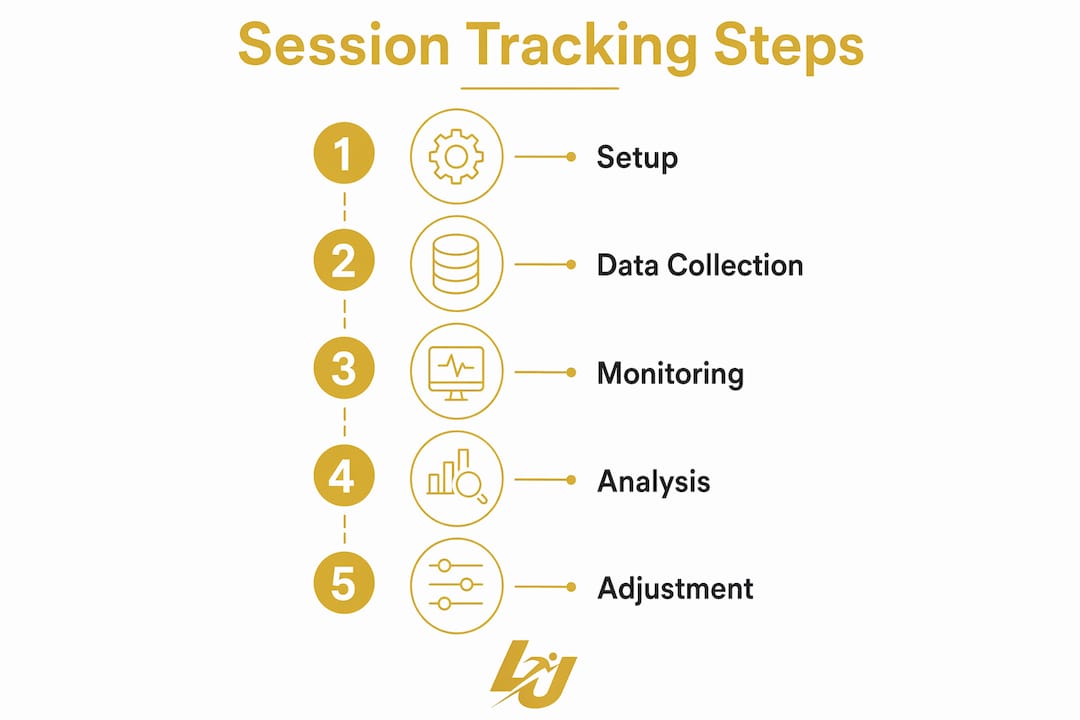
The operational core of any group tracking system is session toggling. One device hosts multiple athlete sessions simultaneously, and the coach or athlete switches between profiles to log sets, reps, times, or wellness inputs. Each entry is written to that athlete’s individual record, not a shared pool.
ChronoTrack takes this further for timing-based sports. Its group workout mode allows a coach to start timing with one command and record individual stop times for each athlete, producing millisecond-accurate data with an integrated spreadsheet view. Track and field coaches, swim coaches, and cycling trainers use this workflow to compare splits across an entire squad in real time.
AthleteMonitoring adds a biometric layer. The platform integrates wearables and injury reports to produce real-time fatigue alerts and readiness scores across the full team. That means a coach is not waiting until an athlete reports soreness. The system flags the risk first.
Manually input platforms like FlutterFlow-based apps support session logging and wellness check-ins without wearable integration. They are useful for lower-budget environments where structured data collection still matters, even without biometric hardware.
Pro Tip: Before your first group session, assign each athlete a unique profile ID in your chosen platform. This prevents data from being written to the wrong record when multiple coaches are toggling between athletes on the same device.
Key technical precautions to follow:
- Confirm only one active session exists per athlete across all devices before starting
- Use role-based access to separate coach input from athlete self-reporting
- Export session data after each training block, not just at the end of a cycle
- Verify wearable sync status before the session begins, not during it
Which platforms lead in group session monitoring?
The four most widely referenced platforms in multi-athlete performance tracking each serve a distinct use case. Here is a direct comparison:
| Platform | Primary Use | Data Types | Key Feature |
|---|---|---|---|
| Metric | Strength and conditioning | Sets, reps, load, wellness | Session toggling on one device |
| AthleteMonitoring | Elite and college squads | Wearables, injury, readiness | AI fatigue alerts |
| ChronoTrack | Timing-based sports | Split times, lap data | Single-command group start |
| FlutterFlow apps | Custom development | Manual session logs | Role-based data entry |
AthleteMonitoring is used across elite, college, and youth programmes to monitor training loads, recovery, and readiness through integrated dashboards and wearable syncing. That breadth makes it the most versatile option for multi-sport academies.
ChronoTrack suits sports where time is the primary metric. Its exportable session data with millisecond accuracy makes it the preferred choice for track, swimming, and cycling coaches who need immediate post-session comparison.
Metric is the strongest option for gym-based or field conditioning work, where the coach needs to move between athletes quickly without losing data continuity.
FlutterFlow-based custom apps fill the gap for clubs that need a tailored solution. Coach-entered and athlete-entered modes allow flexible data submission, and structured session documents store athlete ID, date, load metrics, and notes that are queryable for trend analysis.
What are the benefits of session tracking for sports teams?
The most immediate benefit is time. Coaches running group sessions with athlete data tracking systems report that removing device-swapping alone recovers meaningful minutes per session. Across a full training week, that compounds into hours of reclaimed coaching time.
The deeper benefit is proactive decision-making. AI-driven real-time alerts in platforms like AthleteMonitoring identify fatigue and injury risk patterns before problems arise. That shifts coaching from reactive to proactive, which is the single biggest change data-driven programmes deliver.
Here are the five core benefits coaches and athletes gain from group session monitoring:
- Reduced device overhead. One interface replaces multiple devices, cutting setup time and post-session data reconciliation.
- Fatigue detection across the squad. Combined metrics flag athletes approaching overload before they report symptoms.
- Personalised load adjustments. Readiness scores inform individual training modifications within the same group session.
- Improved staff communication. Coaches, medical staff, and performance analysts share one data source rather than reconciling separate records.
- Visible progress for athletes. Side-by-side comparison views show individual athletes how their metrics are moving, which builds accountability.
Pro Tip: Use your platform’s wellness survey feature at the start of every session, not just on Mondays. Daily readiness data gives you a far more accurate picture of cumulative fatigue than weekly check-ins.
Centralised feedback also improves athlete buy-in. When athletes see their own data visualised clearly, they engage more directly with their development. This is particularly relevant in youth and academy settings, where motivation is as important as physical output. Research on feedback in coaching confirms that timely, specific data improves athlete responsiveness to training adjustments.
Best practices for coaches implementing group tracking
Data integrity is the foundation of any tracking system. Only one active session per athlete should exist across all devices at any time. Starting a second session for an athlete already active on another device creates sync conflicts and corrupts the historical record.
Beyond that single rule, the following practices define well-run group tracking programmes:
- Train all staff on session toggling. A single coach unfamiliar with the interface can create duplicate records or overwrite data mid-session.
- Use side-by-side views regularly. Aggregate team tables conceal individual nuances that are critical to coaching. Parallel columns reveal discrepancies that squad averages hide.
- Review data within 24 hours. Insights from a session lose value quickly. Build a post-session review into the coaching schedule, not the end-of-week debrief.
- Balance manual input with wearable data. Wearables provide objective biometric signals, but athlete-reported wellness scores add context that sensors cannot capture.
- Audit profiles quarterly. Remove inactive athletes, update load benchmarks, and verify that wearable sync settings are current.
The most common failure point in multi-athlete tracking is not the technology. It is inconsistent data entry. A platform is only as useful as the information put into it.
How to integrate tracking into athlete development programmes
Tracking data becomes genuinely useful when it informs the structure of training plans, not just the review of past sessions. Load management is the clearest application. When a coach can see cumulative fatigue scores across the squad, they can adjust the intensity of the next session before athletes arrive, rather than modifying it on the fly.
Wellness and injury monitoring should sit inside the same schedule as physical training. Platforms like AthleteMonitoring integrate both, so a coach reviewing Tuesday’s readiness scores is looking at the same dashboard as the physiotherapist reviewing injury flags. That shared view removes the communication lag that causes athletes to train through early-stage problems.
Multi-sport and hybrid athletes benefit particularly from unified dashboards. A footballer who also trains in the gym needs load data from both environments combined into one readiness picture. Separate systems produce separate records that no one reconciles.
Pro Tip: Set a minimum data threshold before drawing conclusions from your tracking system. Four weeks of consistent daily entries gives you a reliable baseline. Anything less and you are reacting to noise, not signal.
Practical integration steps for development programmes:
- Map your current training cycle and identify where load data would change decisions
- Select one platform and run a four-week pilot with a single squad before full rollout
- Assign one staff member as data lead to maintain entry consistency
- Use dashboard summaries in weekly staff meetings as the primary performance review tool
- Set individual athlete benchmarks at the start of each training block and review against them at the midpoint
Key takeaways
Multi-athlete session tracking works because it centralises data collection, removes device overhead, and shifts coaching from reactive to proactive through real-time analytics.
| Point | Details |
|---|---|
| Core definition | Group session monitoring logs multiple athletes simultaneously on one device interface. |
| Data integrity rule | Only one active session per athlete should exist across all devices at any time. |
| Platform selection | Choose based on sport type: Metric for conditioning, ChronoTrack for timing, AthleteMonitoring for full-squad analytics. |
| Proactive coaching | AI-driven fatigue alerts identify risk patterns before athletes report symptoms. |
| Consistent entry | Tracking systems only deliver value when data entry is disciplined and daily. |
The part most coaches get wrong
I have worked with coaches at every level, from grassroots academies to semi-professional clubs, and the pattern I see most often is the same. A coach invests in a solid tracking platform, runs it well for three weeks, then lets data entry slip because the session felt fine and there was no obvious problem to solve.
That is precisely the wrong way to use these tools. The value of multi-athlete performance tracking is not in the sessions where something goes wrong. It is in the weeks of clean data that let you see something going wrong before it does. AthleteMonitoring’s AI alert system is a good example. It does not flag a problem on the day an athlete pulls up. It flags the pattern of accumulated load and poor sleep scores that preceded it by five days.
The other mistake I see is treating the group dashboard as the final answer. Aggregate views are useful for spotting outliers, but they are not a substitute for looking at individual athlete records. Two athletes can have identical squad-average scores and completely different underlying patterns. Side-by-side comparison views exist for exactly this reason, and most coaches underuse them.
My honest view is that the technology is not the hard part. The discipline of daily entry, the habit of reviewing data before planning the next session, and the willingness to modify a plan based on what the numbers say: those are the hard parts. The platforms are ready. The question is whether the coaching culture around them is.
— Chris
Track every athlete, every session, in one place
Levelup360hq is built for coaches and clubs who want more than a stopwatch and a spreadsheet. The platform combines session management, performance analytics, and athlete development tools into one system that works across football, cricket, netball, rugby, and more.
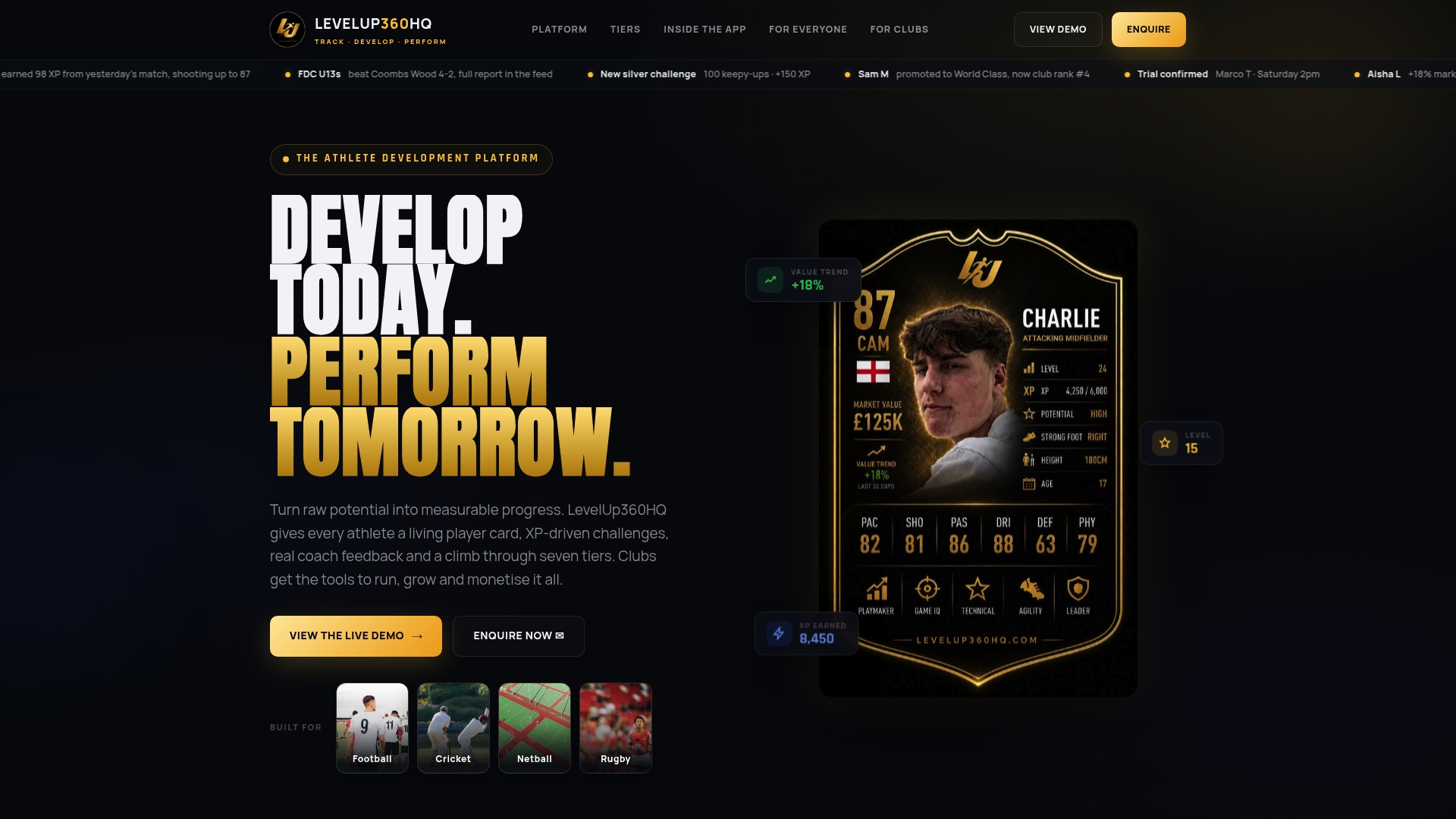
From FIFA-style player cards with real-time ratings to XP-driven challenges and coach approval workflows, Levelup360hq gives every athlete in your squad a visible development record and gives you the data to act on it. Whether you are running a youth academy or a senior club programme, the full platform is designed to replace the patchwork of apps most coaching teams currently rely on. See it in action by exploring the live demo and find out how group session monitoring looks when it is built into the athlete’s own development journey.
FAQ
What is multi-athlete session tracking?
Multi-athlete session tracking is the simultaneous recording and analysis of training data for several athletes during a single session using one unified digital interface. Platforms like Metric, AthleteMonitoring, and ChronoTrack are the most widely used tools for this purpose.
How do you prevent data conflicts when tracking multiple athletes?
Only one active session should exist per athlete across all devices at any time. Starting a second session for an athlete already active on another device creates sync conflicts and corrupts the historical record.
Which platform is best for timing-based multi-athlete sessions?
ChronoTrack is the leading choice for timing-based sports such as track and field, swimming, and cycling. It supports a single-command group start and records individual stop times with millisecond accuracy.
Can multi-athlete tracking work for youth and grassroots programmes?
AthleteMonitoring is used across elite, college, and youth levels, and manually input platforms built on tools like FlutterFlow work well for lower-budget environments. The key requirement is consistent daily data entry, regardless of platform.
How does group session monitoring support injury prevention?
AI-driven platforms like AthleteMonitoring identify fatigue and injury risk patterns through combined wearable and wellness data before athletes report symptoms. That early detection allows coaches to adjust training loads proactively rather than responding after an injury occurs.
Recommended
Turn potential into a player card.
LevelUp360 tracks every match, builds your child's player card, and shows their development over time.
Get started free